No built-in AI.
Transient detection, audio analysis, and seeded humanization use deterministic code. The app does not include AI assistants, generation, or cloud models.
 STUDIO DUO
An open source DAW for heavy music
Your music. Your decisions.
Open source core. No required account. No AI features built in.
Why Studio Duo exists
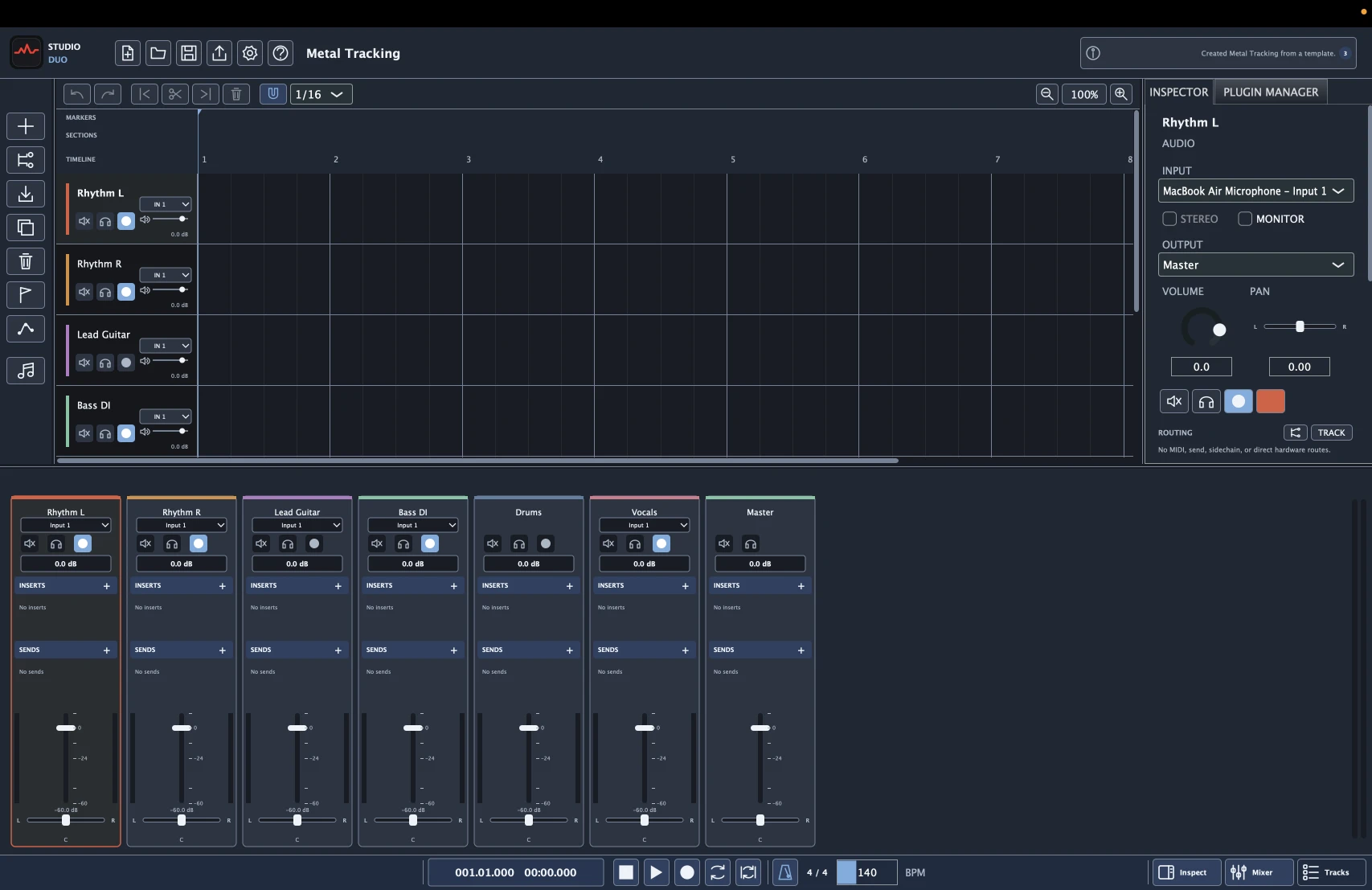
Studio Duo's goal is to let a musician record and finish a song in one local application. It has multitrack audio, MIDI, mixing, and album mastering, with tools aimed at metal production.
It is a smaller, actively developed project. It does less than the established full DAWs below and has far less real-world testing. The focus is linked performance edits, drum programming, DI tracks, and reamping, not a claim of feature parity.
Transient detection, audio analysis, and seeded humanization use deterministic code. The app does not include AI assistants, generation, or cloud models.
Studio Duo processes audio locally. No account or cloud service is required. Portable project copies include media, and the native file format is documented.
Comping, timing edits, and reamp paths preserve the original recordings. Change a comp or tone without replacing the source take.
The core uses AGPLv3. You can inspect or change the code. DAWproject exchange transfers supported session data and reports unsupported details.
Inside the studio
Linked multitrack edits, live MIDI drums, reamp paths, and parallel racks. These are the workflows Studio Duo focuses on.
Tracking & editing
Record sample-aligned multitrack audio, then choose takes with lanes and comping. Link edits across drum microphones, doubled guitars, or DI and amp tracks to preserve their relative timing.
Tested with a Focusrite Scarlett Duo on macOS ARM using CoreAudio. Windows ASIO support is best effort only.
Read the user guide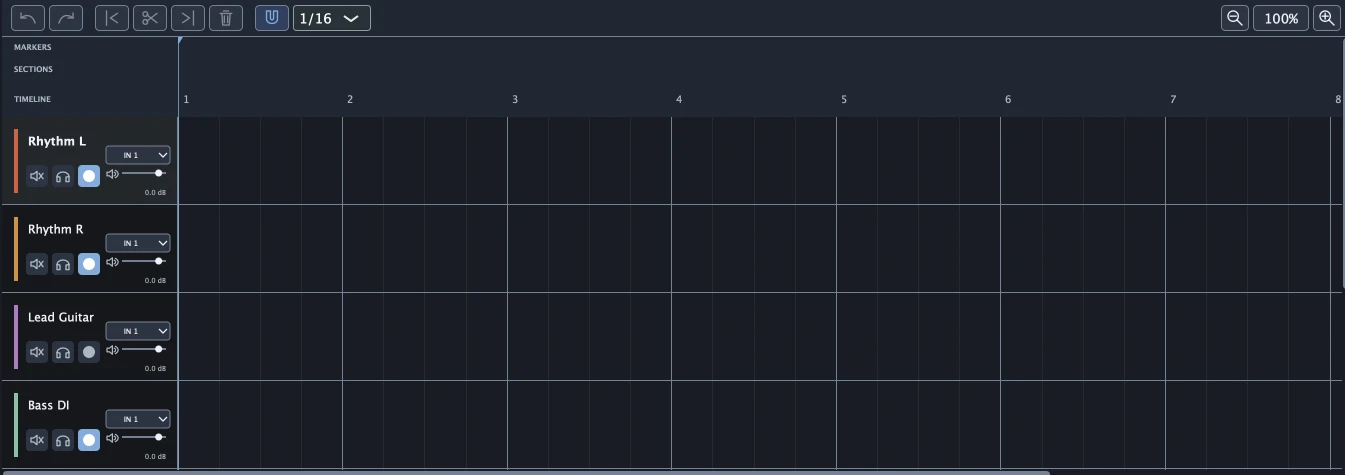
MIDI & metal drums
Play and record native MIDI drums with the kit of twelve performance pads visible. Click the pads or use your keyboard. Edit the recorded hits in the drum grid or piano roll.
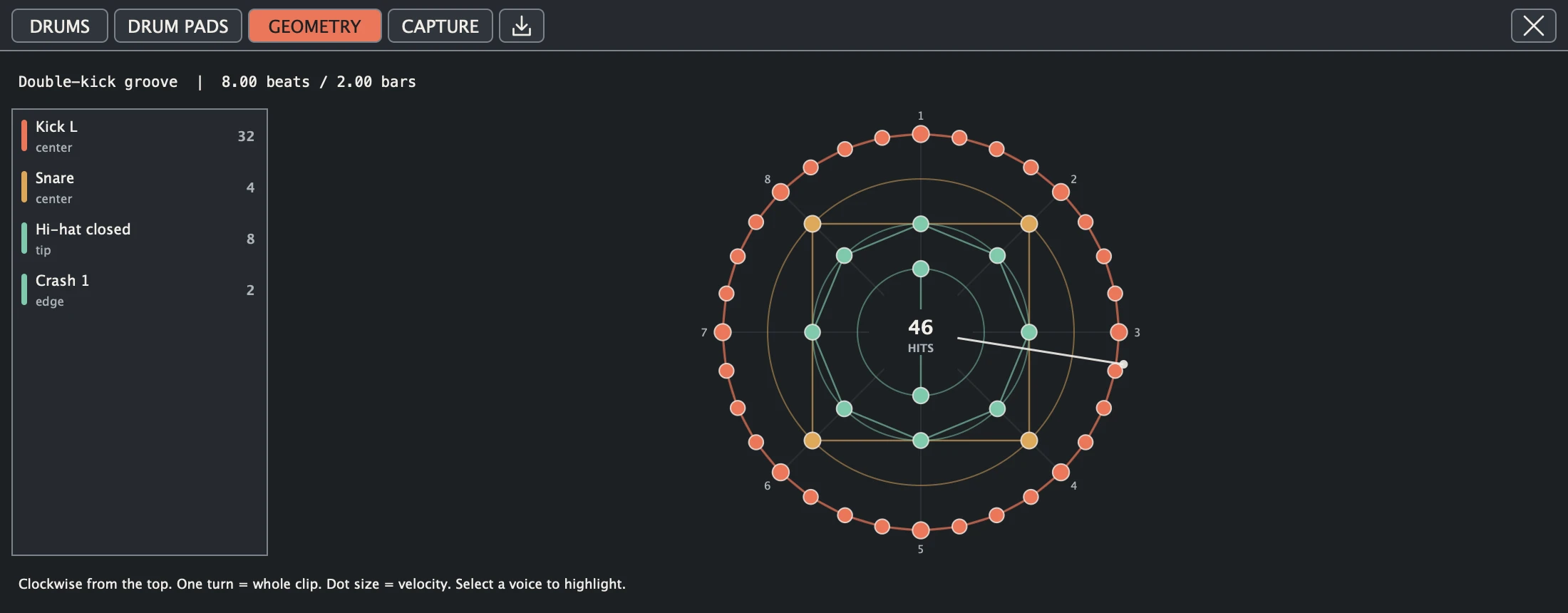
The built-in drum instrument has genre presets and kit tuning. Use blast-beat and double-kick entry tools, seeded humanization, and the song's metronome and count-in. Geometry is an alternate view of the same notes, drawn as rhythm rings.
Mixing & plug-ins
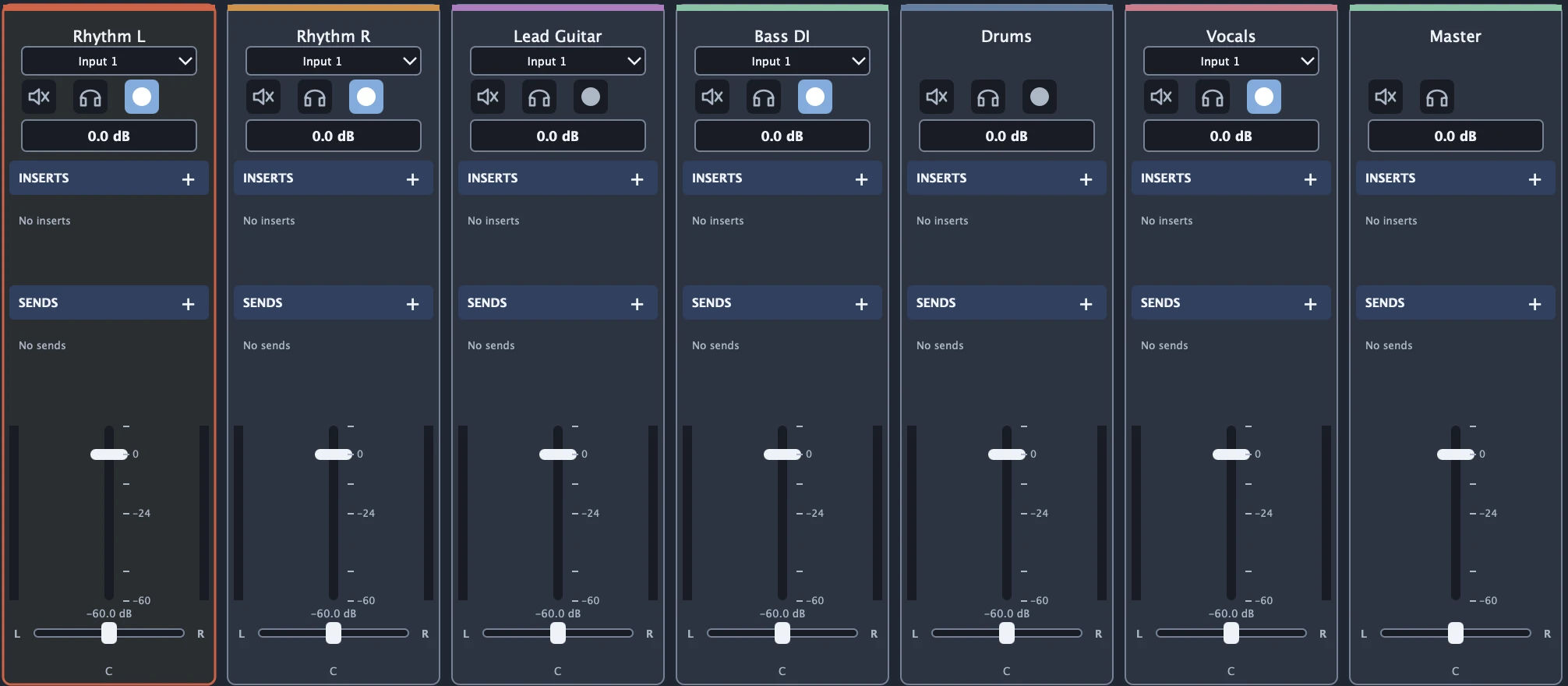
Route tracks through sends, sidechains, auxes, and nested buses. Automate mixer and plug-in parameters. Parallel racks compensate for branch latency, so different processing chains stay aligned.
ARA 2 uses an explicit compatibility mode.
Guitar & bass
Keep the DI and compare amp chains at matched levels. Freeze or print a tone without replacing the source track. The bundled guitar and bass amps include cabinets and accept your own cabinet IRs.
Explore bundled devicesProject exchange
Portable copies include hash-verified media. DAWproject import and export transfer supported session data and plug-in state. Some structures cannot transfer, including native rack topology. Studio One migration also reports its limits.
Check interchange supportMastering & delivery
Sequence songs, set gaps and fades, and add release metadata in the mastering workspace. Measure loudness and true peak. Export mixes and masters as WAV, AIFF, FLAC, Ogg Vorbis, or MP3. Mastering exports include signed render reports.
Explore masteringDDP delivery requires an external licensed encoder.
Partner tools
These are separate, optional tools. Studio Duo does not depend on either project.
A partner VST3 vocal processor for metal and metalcore, developed by mbianchidev. It has a reorderable processing chain, voice effects, and monophonic pitch editing. An Audio Unit version is available on macOS. The repository is private.
Email black.corekid00@gmail.com about ScreamForgeTrack2Stem separates existing audio into vocals, drums, bass, and other stems with Demucs. The AI-powered separation runs in that separate project, not inside Studio Duo. Import the resulting stems as audio tracks.
Explore Track2StemChoosing a DAW
Studio Duo can record and edit audio, write MIDI, mix, and sequence an album for mastering. It does less than the established full DAWs here. It has a smaller toolset, less production testing, and one developer.
This compares Fender Studio Pro, formerly Studio One, Ableton Live 12 Suite, Pro Tools Studio, REAPER 7, and FL Studio Producer Edition. It is not a speed or reliability benchmark. Other editions have different tools and license terms.
On a small screen, scroll the table sideways. Keyboard users can focus it and use the arrow keys.
| Feature | Studio Duo | Fender Studio Pro Formerly Studio One | Ableton Live 12 Suite | Pro Tools Studio | REAPER 7 | FL Studio Producer Edition |
|---|---|---|---|---|---|---|
| License model | AGPLv3 open source core. No required account. Optional paid tools are planned. | Commercial, proprietary. Paid perpetual license and subscription options. | Commercial, proprietary. Paid perpetual license; Suite also has rent-to-own. | Commercial, proprietary. Paid subscription or perpetual license. | Commercial, proprietary. Paid license; 60-day full evaluation. | Commercial, proprietary. Paid license with Lifetime Free Updates to the owned edition. FL Cloud is separate. |
| Desktop platforms | macOS. Windows best effort. Linux unsupported. | macOS and Windows. Linux public beta, with specific system requirements. | macOS and Windows. | macOS and Windows. | macOS, Windows, and Linux. | macOS and Windows. |
| Multitrack audio recording | Yes. Sample-aligned recording, punch, loop takes, and count-in. Limited physical-device testing. | Yes. Audio tracks, loop recording, and multiple takes. | Yes. Record audio into Arrangement or Session View. | Yes. Audio tracks, punch/loop recording, and playlists. | Yes. Multitrack recording with flexible input routing. | Yes in Producer Edition. Record external inputs into the Playlist or Edison. |
| MIDI recording and piano roll | Yes. Live and retrospective recording, piano roll, and per-note expression. | Yes. Instrument recording and note editing. | Yes. MIDI Note Editor, Capture MIDI, and MIDI tools. | Yes. MIDI recording, piano roll, and instrument tracks. | Yes. MIDI recording and MIDI editor. | Yes. MIDI controller recording, Piano roll, and note-property editing. |
| Take comping | Take lanes, playlists, and linked multitrack comps. | Take layers and range-based comping. | Audio/MIDI take lanes and comping in Arrangement View. | Playlists for auditioning takes and building a comp. | Fixed lanes and swipe comping. | Loop takes with manual assembly of Audio Clips in the Playlist or Edison. |
| Drum programming and instruments | Drum grid, 12 live pads, rhythm geometry, and a synthesized metal kit with tuning. | Impact's sample pads, instrument parts, and drum kits. | Drum Rack, Drum Sampler, MIDI editing, and sound packs. | MIDI editing and drum instrument plug-ins. | MIDI editor, sampler/JSFX instruments, and third-party drum plug-ins. | Channel Rack step sequencer, Piano roll, and FPC drum pads. |
| Built-in EQ and effects | 13 bundled devices, including parametric EQ, dynamics, reverb, delay, and guitar/bass amps. A smaller collection. | Native EQ/dynamics/effects and Fender guitar/bass amp plug-ins. | EQ Eight, dynamics/effects, synths/samplers, and Max for Live in Suite. | Included EQ, dynamics, effects, and instruments. Additional bundles depend on the plan. | ReaPlugs and JSFX audio/MIDI effects, including EQ and dynamics. | Native EQ, dynamics, effects, and instruments. Higher bundles add more licensed plug-ins. |
| Third-party plug-in formats | VST3, AU, and CLAP. No AAX hosting. Compatibility coverage is limited. | VST and VST3; AU on macOS. | VST2, VST3, and AU on macOS. | AAX. VST/AU require a separate hosting solution. | VST, VST3, AU, CLAP, LV2, and others, depending on platform. | VST, VST3, CLAP, and AU on macOS. |
| Mixing and automation | Sends, sidechains, buses, nested/parallel racks, latency compensation, and sample-accurate automation. | Console routing, buses, sends, and track/plug-in automation. | Returns, groups, device racks, and Arrangement/clip automation. | Buses, sends, routing, and track/plug-in automation. | Flexible routing, FX containers/parallel processing, automation, and scripting. | Mixer routing, sends, effects chains, and Automation Clips. |
| Mastering workflow | Dedicated album workspace, sequencing, loudness/true-peak analysis, metadata, and render reports. DDP needs an external licensed encoder. | Dedicated Mastering page with sequencing and publication formats, integrated with sessions. | Main-track effects and audio export within a Live Set. | Master processing, bounce, and export within a session. | Track/master processing, render presets, and loudness/render reports. | Master Mixer Track effects and project rendering. |
Test Studio Duo with your own interface and plug-ins before moving an important session. Keep the original project and backups.
Built in the open
Studio Duo runs locally and uses an AGPLv3 core. The planned business model is optional paid plug-ins and content. Neither is required to use the core.
Explore the sourceThe design document explains the roadmap, project formats, plug-in isolation, and audio-thread rules. Real-time audio safety takes priority over appearance.
Read the product designA reproducible bug report helps more than a vague promise of stability. Include the steps, platform, and relevant logs. Documentation and code contributions are welcome.
Contribution guideYour next session
Choose the release for your machine. Start with a blank song or the Metal Tracking, Songwriting, or Mix Session template.
Universal macOS DMG / Windows x64 installer & portable ZIP / Checksums included
Open the DMG and drag Studio Duo.app into Applications first. Current macOS releases are ad hoc signed, not Apple-notarized, so Gatekeeper may block the first launch.
Only continue if you trust the download from the official GitHub release and have verified its SHA-256 checksum against SHA256SUMS.txt from that release. If macOS blocks the installed app, open Terminal and run:
xattr -dr com.apple.quarantine "/Applications/Studio Duo.app"This removes the quarantine flag only from this app; it does not verify the download or make an unsafe app safe. Gatekeeper remains enabled globally. Reopen Studio Duo from Applications.
Windows support is best effort only. I work on Studio Duo alone. I have no Windows testing device, and limited development time restricts hands-on Windows testing.
I test with a Focusrite Scarlett Duo on macOS ARM.
CI builds and checks do not replace physical Windows audio-device testing.
Linux is unsupported. I do not have the time to support its audio-driver integrations and distribution differences.
RAM, storage, and CPU needs depend on your media, track count, and plug-ins. I have not validated fixed performance minima.